
IBM SkillsBuild, a Mobile-First Redesign
A UX problem that hid an integrity flaw.
At a glance
- Problem
- Learners could bypass the quiz, harvest correct answers, and earn a certificate without doing the work. The cut-off Submit button made the gap visible; unlimited multi-select made it structural.
- Decisions
- Keep IBM's system rather than invent a new brand; put proceed on the selected option; enforce a hard selection limit instead of a soft warning.
- Disclosure
- I reported the integrity flaw to IBM before publishing.
Context
I use IBM SkillsBuild on my phone (Android, Chrome) to earn certifications. Along the way I found that what looked like a clumsy mobile quiz was also a certification process that failed its own integrity. This case documents what I found and how I redesigned the most critical screen.
The problem
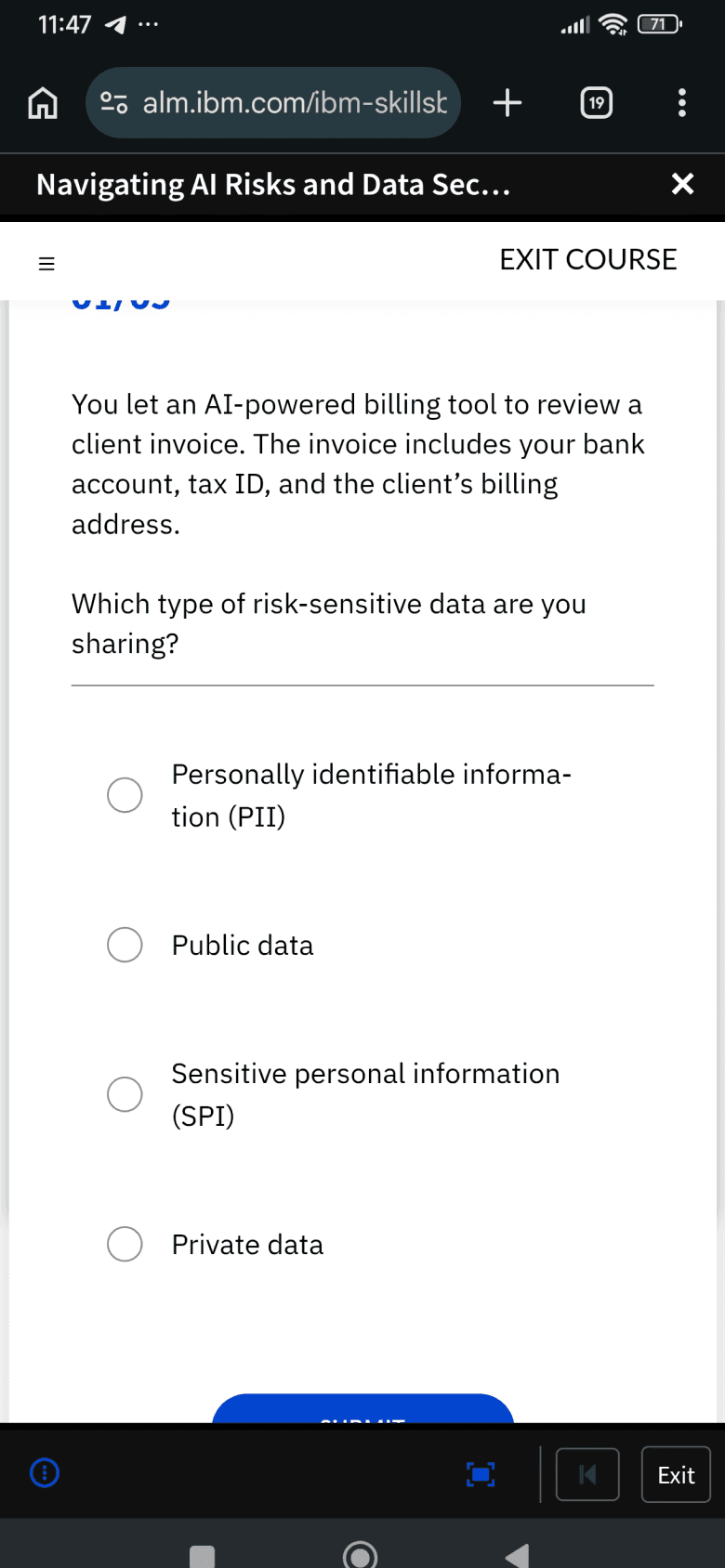
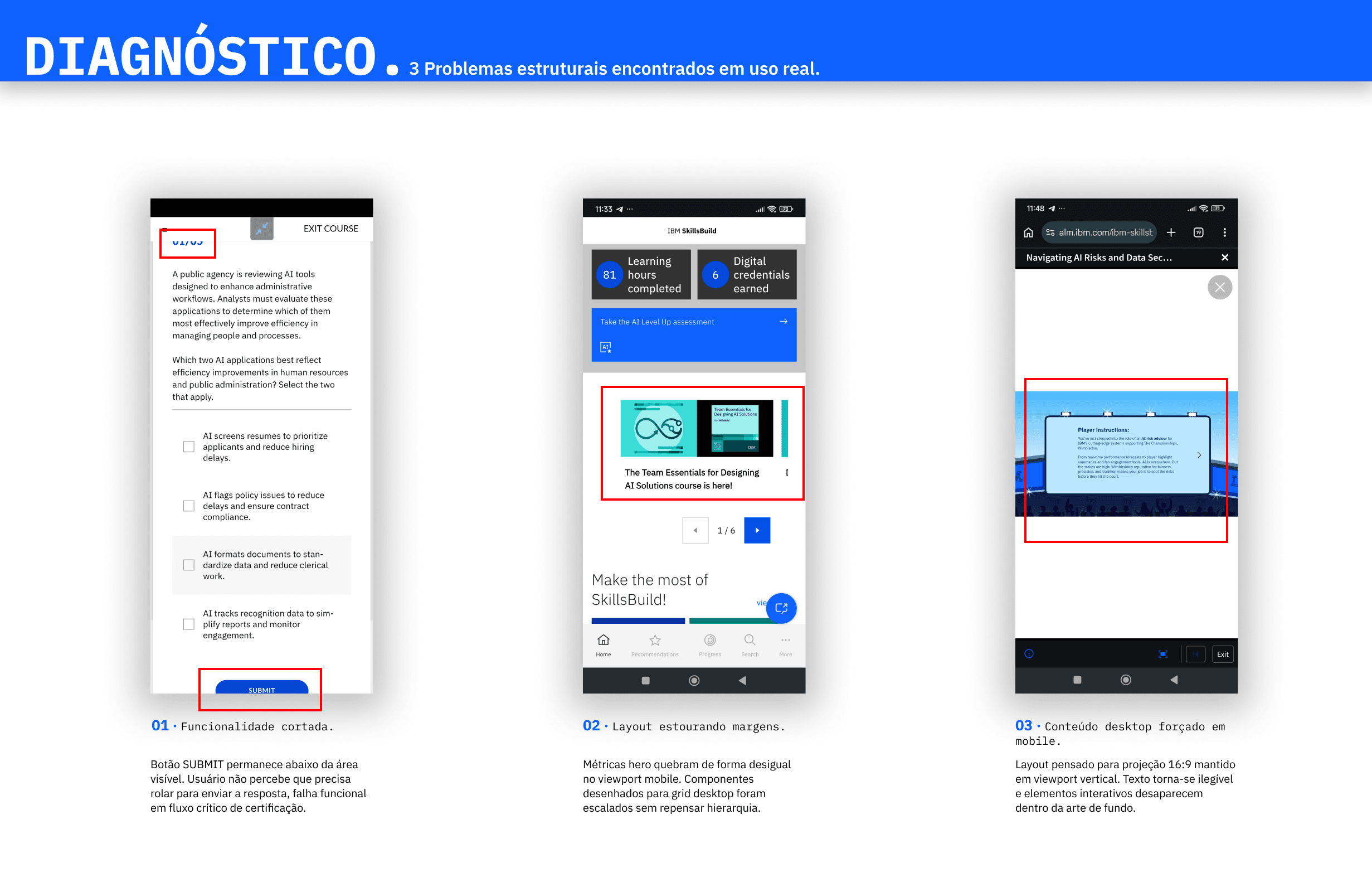
The deeper failure is not layout. On multi-answer questions, the platform does not limit how many options you can select. A learner can keep tapping until the feedback reveals every correct answer, then submit and move on. That path lets someone harvest the quiz, skip the learning, and still walk away with a certificate used in hiring. On a platform that teaches Responsible AI, a credential you can earn without doing the work is a structural failure of the certification process, not a polish issue.
The most visible symptom is simpler: on the quiz screen, the SUBMIT button sits below the mobile browser's visible area, even in the site's full-screen mode. There is no convenient way to confirm an answer. Desktop layouts are shrunk for mobile without rethinking hierarchy, and interactive content stays illegible in portrait or landscape. That cut-off Submit is what first drew attention. Unlimited multi-select is what turns a UX annoyance into an integrity exploit.
Responsible disclosure
Before publishing, I reported the integrity flaw to IBM SkillsBuild by email. The official support channel turned out to be a finding of its own: a Watson chatbot that, when it can't resolve a request, sends you to a new instance of itself, with no path to a human. This case focuses on the design fix, not on how to exploit the flaw.
Decision: respect the system
SkillsBuild's problem is responsive execution, not brand. So the redesign keeps IBM's cobalt palette, the Plex type family, and the structural geometry of the Carbon Design System. Redesigning the brand would solve the wrong problem.
I started from the most constrained viewport (390×844), where the lack of space forces the hierarchy decisions, and built the system to scale up to tablet and desktop without parallel variants. I considered a full cobalt background, a nod to Paul Rand's color blocks, but chose a light field with cobalt accents instead: a saturated full-screen color locks the design into one use case, while light plus accents scales. Cobalt now marks function only (selection, primary action, progress), and a monospaced face for the answer options, borrowed from IBM's technical manuals, separates data from prose.
Decision: selection & submission
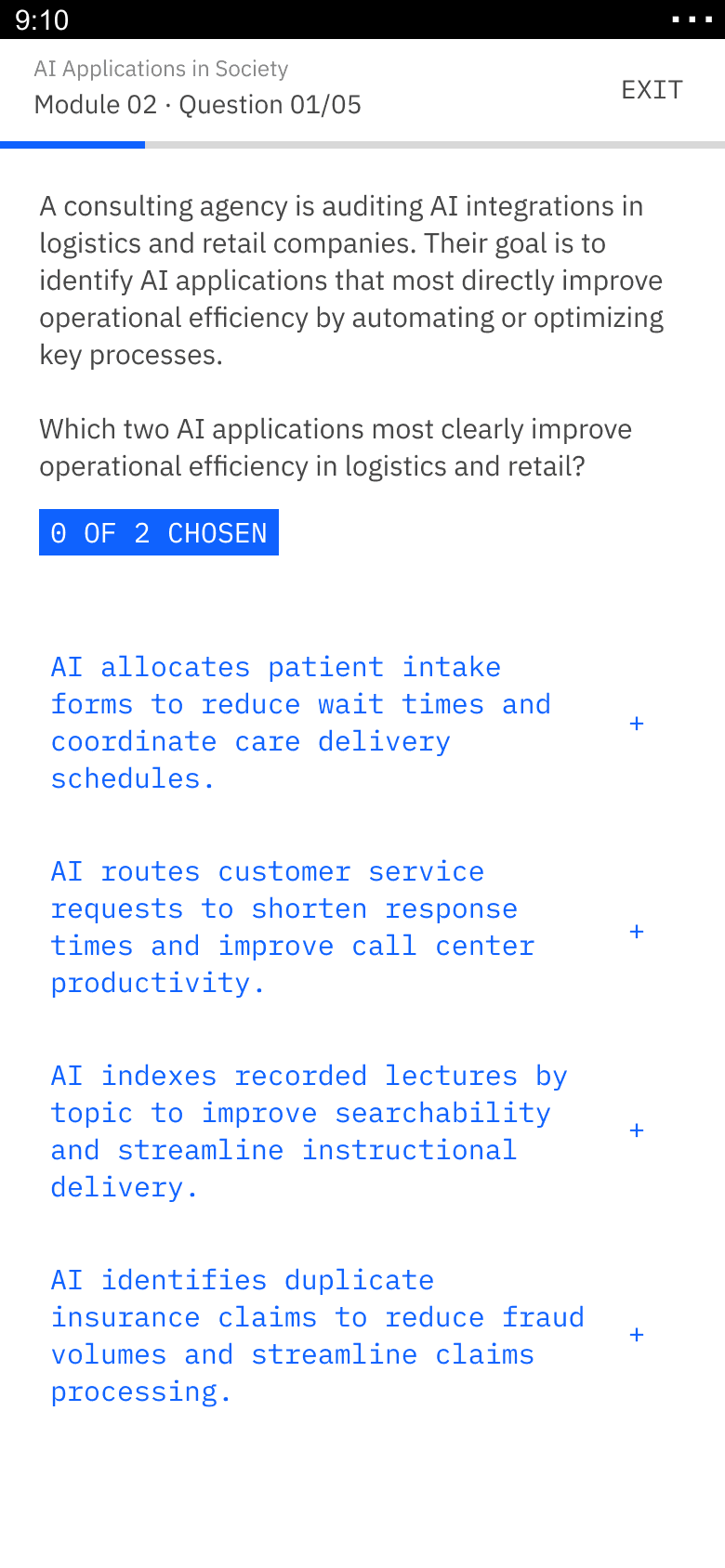
The original splits choosing an answer and confirming it into two actions, with SUBMIT in the footer. On mobile, long questions push that button below the fold, and it puts physical distance between the option you just tapped and the action that moves you forward.
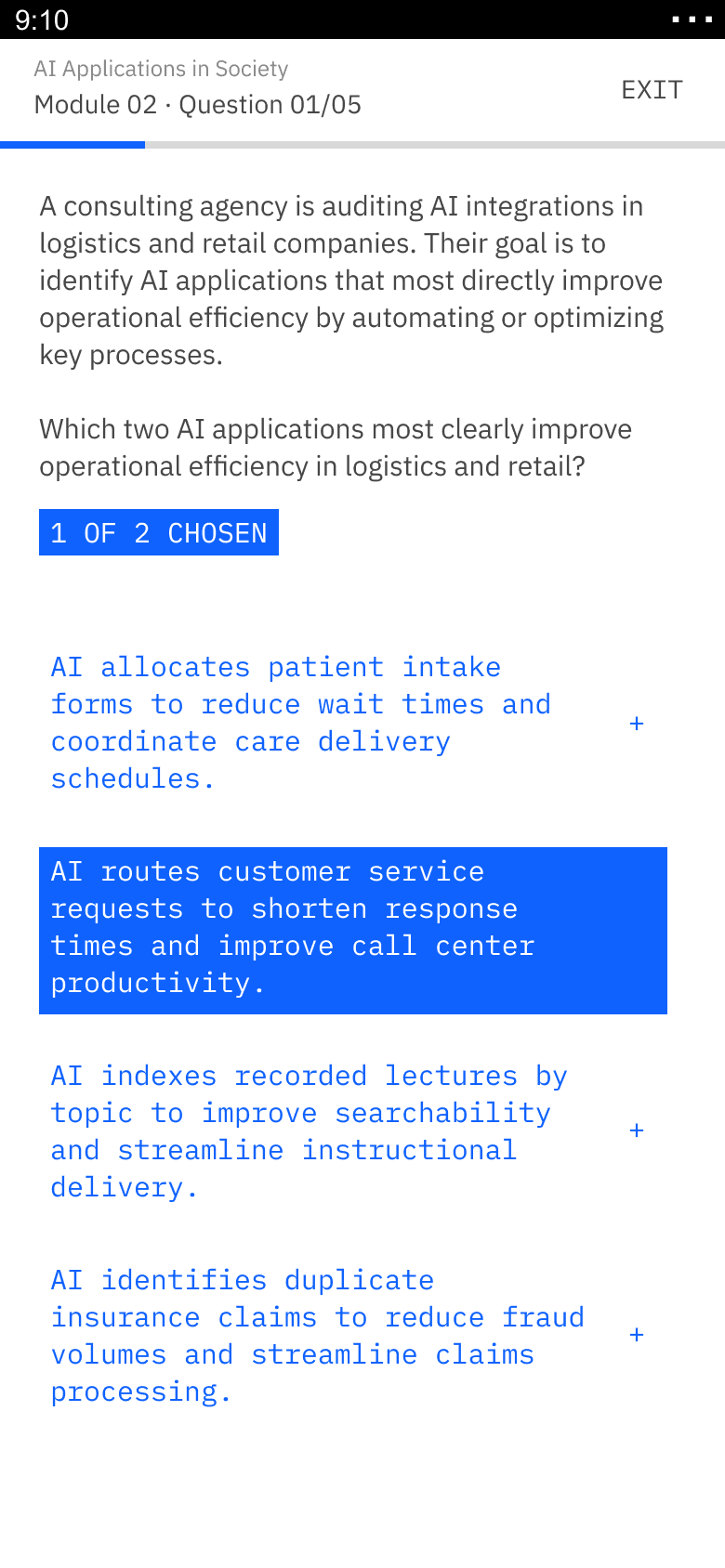
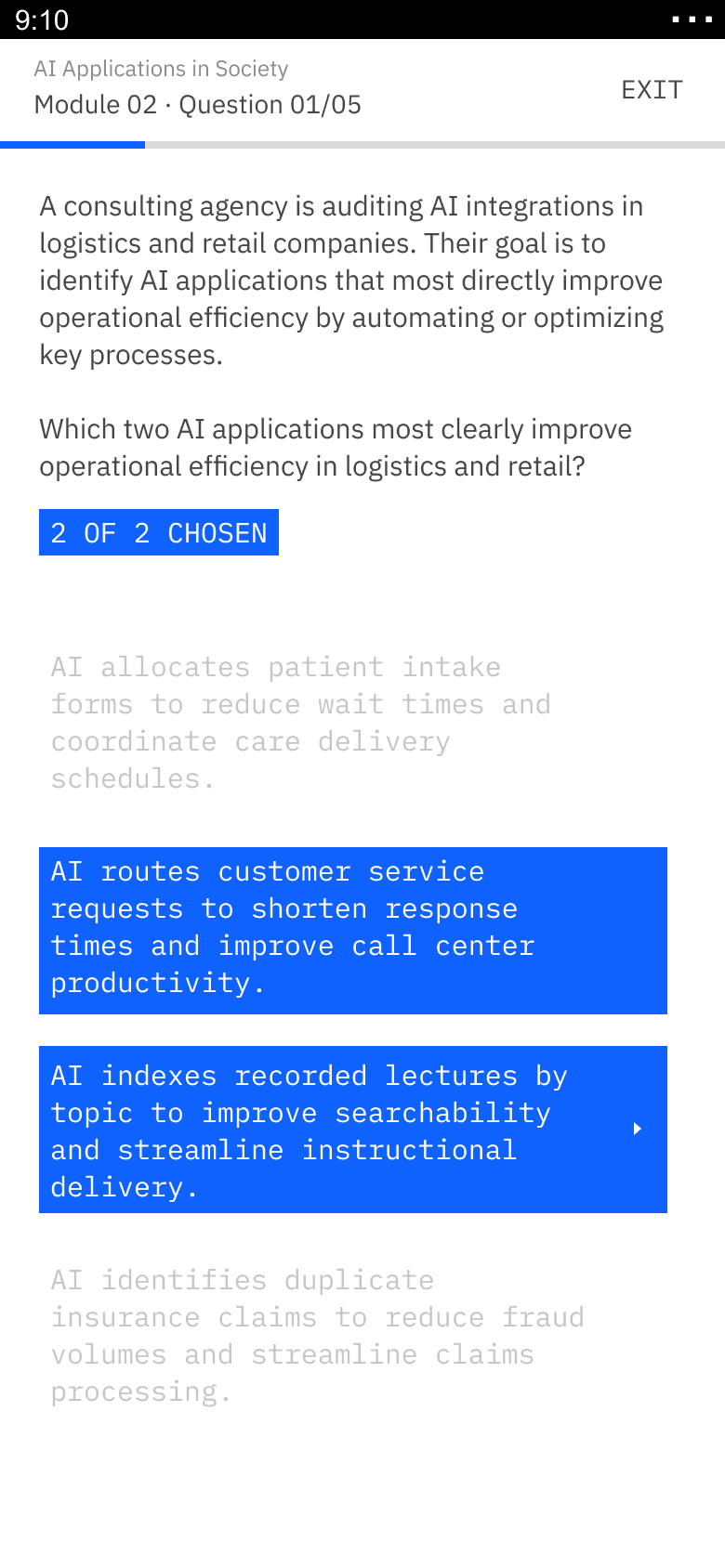
I chose an inline proceed affordance on the selected option over keeping a separate footer Submit: an arrow replaces the "+" symbol on the latest selection, while a counter (1 OF 2 CHOSEN) tracks progress. This applies Fitts's Law: the time to reach a target depends on its distance and size. The next action now sits where the eye and thumb already are, at the bottom-right corner of the option.
Decision: hard selection limit
For multi-answer questions, users can't select more options than requested. Tapping another option at the limit triggers brief feedback: the counter pill switches to an error state with a micro-animation and a short message, then fades back. To change an answer, you deselect one, and the arrow moves to the latest valid selection.
I chose a hard limit over a soft warning because a warning still lets the learner over-select and read feedback on every option. That reopens the exploit. A forcing function prevents the error instead of flagging it afterward. Quiz integrity is part of the implicit agreement between platform and learner; allowing the limit to be exceeded, even politely, fails that agreement.
States as a system
The screen has three states: no selection, partial selection, and full selection. Each option keeps two fixed anchors, a structural marker at the top left and a reserved slot at the right that the arrow fills only when you can move forward. The counter pill (0 OF 2, 1 OF 2, 2 OF 2 CHOSEN) and the selected option share the same cobalt language at different scales, so every change of state is predictable.
Reflection
Out of scope here: tablet and desktop adaptation, an animated prototype of the state transitions, and the error-state frame. Each extends the same vocabulary. What the work proves is narrower: a mobile UX failure can mask a certification process that no longer verifies learning, and the fix has to close the exploit, not only move the Submit button.